
Some of you creative people might be saying, "Sam, how do I add pictures to my website?"
EASY!
STEP 1: Find an awesome photo!
STEP 2: Right click and click "Copy Image Address"

STEP 3: Your going to type a < img src > code! It should look like this
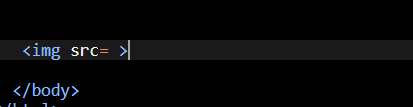
STEP 4: Paste the Image Address next to the = sign and add "" around the Image Address

NOW YOU HAVE PHOTOS ON YOUR WEBSITE!!!!!